


Engineering
Kafka Log Compaction and WarpStream: How Blinkit and Zomato Cut Logging Costs 60%
How Blinkit and Zomato swapped self-managed Kafka for WarpStream to cut logging costs 60%, and used Kafka log compaction to shrink a 5-hour job to 30 minutes.
Author
Bytelify Team
Published
Reading time
23 min

This post is based on the talk Scaling Kafka at Blinkit & Zomato with WarpStream by Pradeep Khileri, a Site Reliability Engineer at Blinkit, given at an industry event where teams share success stories. It is a peek into Blinkit engineering, the Blinkit tech stack, and how the Zomato engineering team runs Kafka at scale. It covers two problems the Blinkit team solved: how they set out to reduce Kafka cost with WarpStream (a Kafka alternative that stores data in S3), and how Kafka log compaction made a nightly job much faster.
The short version
- Eternal logs 25 GB every second. Running its own Kafka for this was costly and a lot of work.
- Switching to WarpStream (Kafka that stores data in S3) cut the cost by about 60%.
- Turning Kafka topics into tables with log compaction cut a nightly job from 5 hours to 30 minutes.
Words You Need First
If you are new to Kafka, these seven terms are enough to follow the whole post.
- Kafka: a system that moves streams of messages (called records) between programs.
- Topic: a named stream of records, like a folder that holds one kind of message.
- Partition: a topic is split into partitions so many programs can read it at the same time.
- Broker: one Kafka server. A Kafka cluster is a group of brokers.
- Producer and consumer: a producer writes records to a topic. A consumer reads them.
- Offset: the position number of a record inside a partition. It only goes up.
- S3: Amazon’s cheap file storage. It is very safe and always available.
The Big Logging Problem at Zomato, Blinkit, and District
Eternal is the company that owns Zomato (food delivery), Blinkit (fast grocery delivery), and District (going out and events). Together they handle millions of orders every day in more than 200 cities in India. One shared data platform team looks after the logs for all of them. This Kafka logging pipeline is the part of the system this post is about. It is a log ingestion architecture built for observability at scale, and the Blinkit Kafka and Zomato Kafka traffic all flows through it.
Here is the size of the job:
| Measure | Value |
|---|---|
| Log data at the busiest time | 25 GB every second (uncompressed) |
| Records | About 1 billion every minute |
| Size of one record | About 1.5 KB |
Running Your Own Kafka: Four Years of Pain
Four years ago, the team ran its own Kafka cluster. Back then the load was only about one-sixth of what it is today. Even so, they needed a 24-broker cluster shared by Blinkit, Zomato, and the other brands.
Nobody can predict exactly how many orders will come in, so the amount of logs is also hard to predict. This caused three problems:
- Paying for idle machines. They had to buy enough machines for the busiest moment, all the time. Most of the day, many of those machines sat idle.
- Moving partitions around. Scaling Kafka by adding brokers meant rebalancing partitions across brokers every time.
- Copying data. They ran mirror-maker jobs to copy data between clusters.
These are the usual headaches of running Kafka yourself.
Meet WarpStream: Keep Compute and Storage Apart
About three years ago, the team read a Hacker News post called “Kafka is dead, long live Kafka” by Richie from WarpStream. It sounded too bold, so at first the team brushed it off and asked, “Are they serious?” But the idea behind it was real. For many years, data tools have been moving toward one rule: keep the computers that do the work separate from the place where data is stored.
The post that started it
“Kafka is dead, long live Kafka”
The title of the Hacker News post by Richie from WarpStream that the team first doubted. Read the discussion on Hacker News or the original article on the WarpStream blog.
WarpStream is a “diskless Kafka”. It speaks the Kafka language, but it is Kafka on S3. That makes it a Kafka alternative with separate compute and storage. (In this post, “WarpStream Kafka” means the Kafka-compatible WarpStream service. It is a case study of one Kafka alternative, not a list of every alternative to Apache Kafka.)
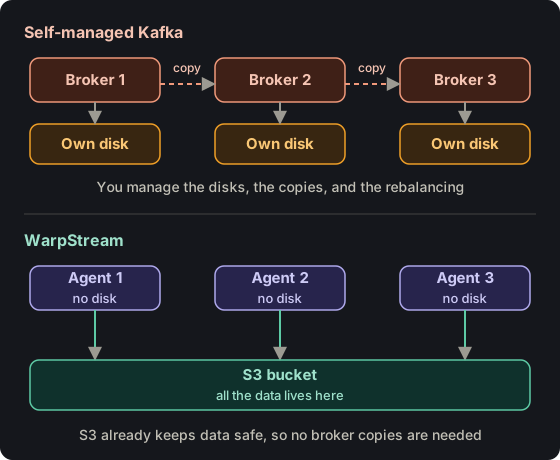 Where the data lives in Kafka and in WarpStream.
Here is how WarpStream works:
- Compute agents speak the Kafka language and answer requests. They have no disks of their own. There are no EBS volumes and no NVMe drives.
- Every record goes straight into S3. S3 takes the place of the folder where a Kafka broker normally keeps its data (the
log.dirsfolder), and nobody has to manage it. - A separate control layer keeps track of things like offsets and which agent is doing what. In normal Kafka, ZooKeeper or KRaft does this job.
Putting S3 under the compute layer brings two big wins:
- There are no broker disks to look after, and no need to move partitions between them.
- There is no need to copy records across brokers to keep them safe. S3 is already very safe and always available, so that work is gone.
Bytelify note: in plain Kafka, getting data from Kafka to S3 takes an extra step, such as a sink connector. In WarpStream, S3 is where the data lives from the start.
The New Setup: One Agent Group per Brand, One Shared S3 Bucket
Blinkit, Zomato, and District each live in their own AWS account. Each one has its own WarpStream compute agents that take in its logs. All of them write to the same S3 bucket, which sits in a central data-platform AWS account.
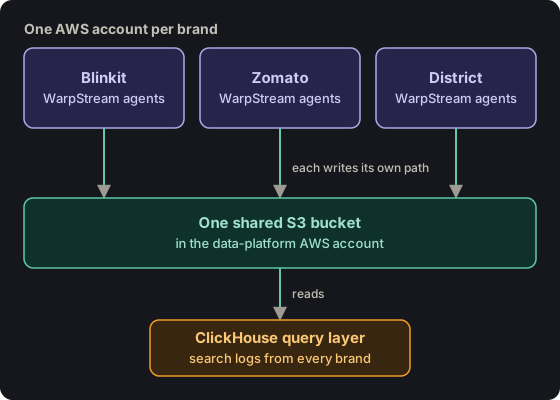 Three brands write into one shared bucket, and one query layer reads from it.
The data platform team also runs a ClickHouse query layer, with its own compute agent. It reads from that same S3 bucket so people can search logs from every brand. Because everyone writes to one bucket, there is no need to copy data between clusters, so there is no data transfer bill for that.
Put together, this is Eternal’s architecture for log ingestion: agents take the logs in, S3 stores them, and ClickHouse log analytics lets people search them. It gives observability at scale without a huge Kafka cluster.
The result: compared with running its own Kafka cluster at today’s 25 GB per second, the team says it saves about 60% of the cost. That is Kafka cost optimization at a very large scale.
A Second Problem: Batch Jobs That Took Five Hours
The second story is about Blinkit. Blinkit serves more than 200 cities, hundreds of thousands of customers, and hundreds of thousands of products. That creates a nonstop flow of changes. There are three main kinds:
- Stock: items moving from a warehouse to a dark store to a customer.
- Money: payments moving between vendors, warehouses, dark stores, and customers.
- Catalog: new items, updated details, sales going live, and new offers.
Blinkit has a real-time pipeline, plus a nightly indexing job that refreshes everything. Three years ago, all of these changes went into that nightly job through an aggregation layer. The design was simple and slow. It made many HTTP calls to other services to fetch extra data and apply business rules. That nightly job took about five hours.
Turn Kafka Topics Into Tables with Log Compaction
The team had a big idea: for most of these streams, only the newest value of each record matters. Here is a simple Kafka log compaction example. Say a product has 100 items in stock at time 0, then 50 at time 1, then 200 at time 10. The job only needs to know about the 200. It does not need the whole history.
Kafka has a feature that does exactly this, called log compaction. The team set two things on each topic:
retention.ms = -1, which means “never delete records just because they are old”.cleanup.policy = compact, which means “keep only the newest record for each key”.
They also set a maximum compaction lag of about two hours. This tells Kafka to keep cleaning each partition so only the latest value for each key is left. This is what people mean by Kafka compaction, log compaction in Kafka, or Kafka topic compaction.
A Kafka compacted topic like this acts more like a table. You can use a Kafka topic as a table, with one row per record ID, instead of a long list of every event ever sent. The use case for a compacted Kafka topic is any stream where only the latest state matters, such as stock levels or prices.
Some of these topics get very bursty traffic and others get steady traffic. Even after a big burst (say 50 GB), a compacted topic settles back to the same latest state, so the job always sees a stable table.
Once the topics were compacted, the nightly job became easy:
- Load the whole cleaned-up topic into memory.
- Apply the business rules.
- Finish.
There was no more waiting on five hours of HTTP calls. The indexing job that took five hours now finishes in about 30 minutes.
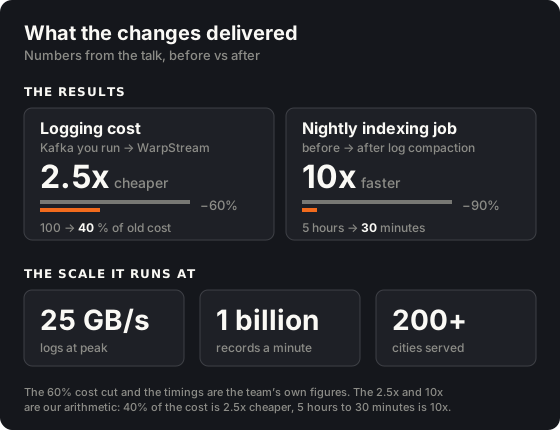 Both changes at a glance, with the scale they run at.
Kafka Compacted Topic Configuration Reference
Note: this section and the next one are Bytelify’s own notes about regular Apache Kafka. They were not part of the talk.
Compacted topics in Kafka need only a few settings. This is the whole Kafka log compaction configuration in one place:
| Setting | Value | What it does |
|---|---|---|
cleanup.policy |
compact |
Keeps only the newest record for each key. Use compact,delete (the Kafka cleanup policy “compact and delete”) to also remove old records by age or size. |
retention.ms |
-1 |
Never deletes records because of their age. This is the setting used in the talk. The Kafka default retention.ms is 7 days (604800000). |
max.compaction.lag.ms |
7200000 |
The longest a record can wait before it can be cleaned up. This is about 2 hours. |
min.cleanable.dirty.ratio |
0.5 (default) |
How much of the log must be “messy” before Kafka cleans it. A lower number cleans sooner. |
delete.retention.ms |
86400000 (default) |
How long a delete marker (called a tombstone) is kept, so readers can see it. |
Compaction vs retention: the Kafka cleanup policy decides what happens to old data: delete it, compact it, or both. Kafka retention ms (retention.ms) decides how long records are kept. With compact alone and a retention.ms of -1, nothing is deleted because of age. With compact,delete, Kafka compacts the log and also deletes segments older than the retention time. That is how Kafka compaction and retention work together.
Here is how to create a Kafka compacted topic with the settings from the talk:
kafka-topics.sh --create --topic inventory-updates \
  --partitions 10 --replication-factor 3 \
  --config cleanup.policy=compact \
  --config retention.ms=-1 \
  --config max.compaction.lag.ms=7200000
Why Kafka Log Compaction Is Not Working (Common Causes)
A common problem is Kafka log compaction not working: the compacted topic still has many values for the same key. Check these causes one by one:
- Records with no key. Compaction works by key, so Kafka rejects records with no key on a compacted topic. Make sure every producer sets a key.
- The active segment is never cleaned. Kafka only cleans closed segments. On a quiet topic, the current segment can stay open for a long time. Lower
segment.msorsegment.bytesif you want cleaning to happen sooner. - The messy-log threshold was not reached. Until
min.cleanable.dirty.ratiois met, Kafka skips the partition. Settingmax.compaction.lag.msforces it to be cleaned anyway. - The log cleaner is off or has stopped. Check that
log.cleaner.enableistrueon the brokers, and look for cleaner errors in the broker logs. - Expecting delete markers to vanish right away. A tombstone (a record with a key and an empty value) stays for
delete.retention.msafter cleaning. Readers can still see it during that time.
Remember: compaction promises to keep the newest value for each key. It does not promise that older values disappear at once. A consumer reading near the end of the log may still see earlier updates.
Why Use WarpStream and Not Regular Kafka for Compaction
The talk also explains why the team ran this compaction work on WarpStream and not on regular Apache Kafka. In regular Kafka, one broker does three jobs at once: it takes writes, it serves reads, and it runs compaction. All three use the same CPU. If a burst of writes arrives just as a partition is ready for compaction, the broker’s CPU can jump from a comfortable 40 to 50 percent up to a scary 90 percent.
With WarpStream, the work is split across separate groups of compute agents:
- Everyday traffic: one group handles normal reads and writes.
- Batch reads: another group handles batch-style reads.
- Compaction: a third group only does compaction. It pulls data from S3 and cleans it. It never touches the normal Kafka traffic.
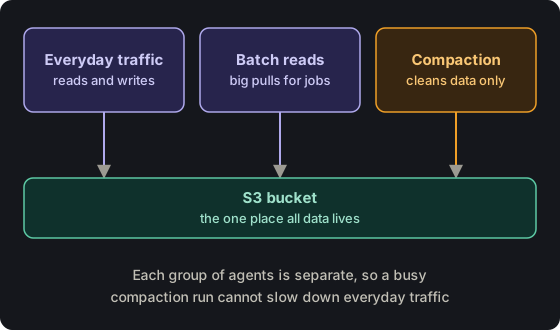 Three separate agent groups share one S3 bucket.
This split also made test environments simple. Because the data always lives in S3, a pre-prod environment is just one compute agent away: point it at the same data, reapply your indexes, and reindex Elasticsearch, because the compacted topics always hold the latest data. There is also no need for Kafka MirrorMaker to copy production data into a test cluster, and no VPC peering or extra network setup.
WarpStream vs Kafka: Side by Side
Note: this is Bytelify’s summary of the differences from the talk, comparing self-managed Kafka vs WarpStream. The tiered storage paragraph is our own addition.
Kafka also has a feature called tiered storage, which moves older data to cheaper storage such as S3. Recent data still sits on broker disks, so you still manage brokers. WarpStream goes further and keeps all data in S3 from the start.
| Area | Kafka you run yourself | WarpStream |
|---|---|---|
| Where data is stored | Broker disks (EBS or NVMe) | S3 |
| Planning for traffic | Buy for the busiest moment and pay for idle time | Agents have no data, so you can scale compute on its own |
| Moving partitions | Needed when brokers change | Not needed, because brokers hold no data |
| Keeping data safe | Copy it across brokers | S3 already keeps it safe |
| Compaction | Shares CPU with reads and writes on one broker | Can run on its own agent |
| Test copies of data | MirrorMaker, a second cluster, and extra networking | Point another agent at the same S3 data |
| Source code | Open source | The agent is closed source |
More Details on How It Runs Day to Day
Here are a few more facts about how this setup works in real life.
S3 Access Between Accounts Stays Inside AWS
Even though the brands sit in separate AWS accounts, reading and writing the shared S3 bucket never leaves the AWS network. It does not go over the public internet.
Each Brand Is Kept Apart
The brands do not share a data layer. Each tenant gets its own separate S3 space and its own guardrails, so one brand’s data never bleeds into another’s.
The data platform team works like a small startup, and every brand is its customer. It is the same way you trust ClickHouse or Confluent to manage your data. This way of thinking has a history: Blinkit and other verticals came out of Zomato, so the team builds services expecting that a new company might be spun out of them one day.
Fixing Problems: Offset Resets and Fan-Out
Kafka and WarpStream keep data as a log, where new records are only added at the end. So fixing a problem usually means going back and reading again from an earlier spot. There are two main tools:
- Offset reset. If something failed at a certain time, move the consumer’s offset back to just before that time and process again from there. Say it failed at time 5 and you want to re-read from time 3. Kafka can find that spot because each file records when it was created and last changed.
- Fan-out. Use this when a consumer falls far behind. Say a topic has 10 partitions and a very high throughput builds up a lag. You can run at most 10 consumers at once, one per partition, but your business is being hurt and you need to go faster. So use Kafka Connect’s MirrorMaker source connector (more on it below) to copy the data, from the same snapshot and offset, into a new topic with 100 or 1,000 partitions. Then start 100 or 1,000 consumer processes, one for each partition, to catch up in parallel. This is also how you scale Kafka consumers.
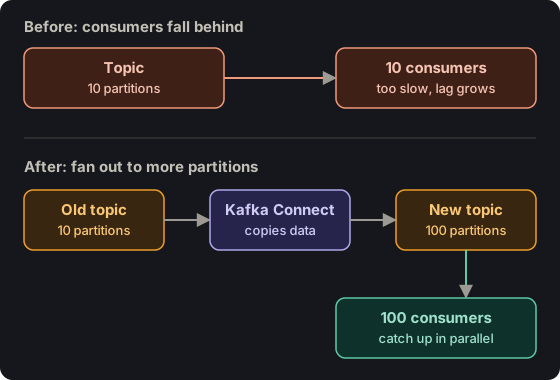 Fan-out gives slow consumers more partitions to work with.
Both fixes only work if consumers are idempotent. That means running the same message twice is safe. If a consumer is not idempotent, a replay can do the same thing twice. One real example is refunding a customer ₹100 two times because an offset was reset. Teams protect against this in two ways:
- The service checks its own database to see if that event (like one order’s refund) was already handled.
- Each record gets a UUID, and the team tracks which UUIDs are done in a cache like Redis.
How fast you must recover depends on each service’s own SLA. At Blinkit, if an outage at 7 PM is not fixed by 7:30 PM, it is a serious incident. So the team needs to clear a backlog within about 5 minutes of breaking an SLA. They do this by starting extra fan-out jobs and more Kubernetes consumers right away. The proper cleanup waits until the quiet hours of the night.
Watching WarpStream Without Seeing Its Code
WarpStream shares Prometheus metrics, and that is what the team uses. Blinkit mostly uses the LGTM stack (Loki, Grafana, Prometheus and friends). They stopped using Loki because they have their own in-house logging platform, called LogStore.
With the Prometheus metrics, the team watches each compute agent (the same job as a Kafka broker). They check three things:
- Is it running out of CPU?
- Is its pod network overloaded?
- Is its temporary disk running low?
They have alerts and keep some spare room on purpose.
Keeping offsets matched between S3 and WarpStream’s own metadata layer is WarpStream’s job, not Blinkit’s. At worst, a person searching logs might see a few repeated entries. A dedupe step before the data reaches ClickHouse handles that. The offset tracking itself is done by WarpStream’s control layer. WarpStream told the team that it uses a DynamoDB control plane for the consensus and the offsets, so as long as that is healthy, the team is fine. Blinkit’s own concern is only the compute agents, which run on its Kubernetes cluster. In regular self-managed Kafka this is not a worry, because an offset is just a number that goes up by one for each record in a partition.
Using Ordered Kafka Topics to Avoid Database Deadlocks
Someone asked whether Blinkit uses optimistic concurrency control or pessimistic locking when consumers update the same data. The answer was that it depends on the workload, and then came a story from two or three years ago.
Blinkit’s Order Management System (OMS) runs the state of each order. It tells the store-operations service to pick an order. The store replies with an event that the order is picked. OMS then asks the last-mile service to take the order from the store to the customer, and last mile reports that it is on its way. So two or three systems publish events back to OMS, and several may try to update the same order at nearly the same time.
If all those updates hit the database at once, they can cause deadlocks when order volume is high. So the team sends the events through an internal Kafka topic first:
- Services publish their events to the topic.
- Kafka keeps strict order inside each partition, so events for one order are always handled one after another.
- The database never has to apply two clashing updates to the same row at the same time.
Because the states are handled one after another, the team does not have to think much about optimistic or pessimistic locking. They can still fan out and use as much parallelism as they want. Deadlocks were a real problem about three years ago, and at this scale (very high orders per minute) they cannot be allowed to happen.
A follow-up question asked whether this still works while someone else queries or updates the same state. It does, as long as you are not answering with an HTTP call. With HTTP, each request needs an immediate answer from Postgres or MySQL, and too many requests taking locks on the same row will break the database at scale. That is how Kafka became popular at LinkedIn in 2011: put the events in an append-only log with strict ordering, because the database cannot handle them all at the same time.
Offsets Change When You Move to a New Kafka Cluster
Someone asked what happens to a consumer’s offset when you copy a topic to a new cluster. An offset is just a counter. A partition in the old topic may start at offset 100, because the older records were compacted away. After mirroring, the new topic counts from zero, because that is the state of the new cluster. So the numbers do not match, and you have to decide where the consumer should continue on the target topic. This is called offset translation. There are two ways to handle it:
- Kafka Connect. The MirrorMaker source connector and checkpoint connector create internal topics at the source and the target, and that is how they translate the offsets. You can start moving data and let them handle it. The team does not run the full MirrorMaker jar, which is complicated. It uses Kafka Connect instead, a Java server that ships with Kafka. You apply a JSON config that names the source cluster and topic and the target cluster and topic. It can also repartition, which is how fan-out works.
- A manual backup. If you still do not trust it, you can peek at the records with
kafkactl, a tool written in Go that is better thankafkacat. It shows each record’s metadata and time, so you can reset the offset by time, like “the last 30 minutes” or “the last hour”.
This is only safe when consumers are idempotent. The speaker’s advice is to make idempotency checks an engineering practice everywhere Kafka is used in your company, because Kafka issues will force you to reset offsets and mirror data.
Polling Is Tuned by Hand for Each Job
How a consumer polls depends on the job. The consumer talks to the broker, not the producer. For batch jobs, a consumer may read a big range of offsets quickly, process it, and then save its place once for the whole batch, for example moving the counter from 1 to 100 after processing 100 messages. To go one record at a time, you can tune the poll time and the maximum records per poll.
Kafka’s poll loop is simple. It is a loop that never ends and keeps reading forward in a file. Think of it from first principles: you are reading a file, seeking to a pointer, taking what you need, and deciding how fast to go based on time, size, and your SLA. At Blinkit this is set by hand, not automatically. Services use an in-house library built on the Confluent Kafka Go client, and each service overrides a few settings to match its own SLA.
How Teams Agree on Schema Changes
Someone asked what happens when the source changes, such as a renamed field or a longer column. Do all the downstream teams have to change things by hand, or does it flow through on its own? The answer starts with the technical side. When a producer team wants to change what a record looks like, they handle it like an API version. If you move an API from /v1 to /v2, you still support v1 until clients migrate, and they do not break existing consumers. The steps look like this:
- The producer keeps sending the old format and starts sending the new one too.
- Each record carries its schema version in a header, such as “v1” or “v2”.
- Consumers check the header. They can keep using the version they know, or move to the new one when they are ready.
- Both versions work side by side until everyone has moved.
Getting teams to agree is about people, not tools. Each team acts like its own small startup. When it changes a schema, it announces it, for example in a Slack channel, like a company announcing an API change to its customers. Teams watch metrics, such as how much traffic still uses the old version. They keep supporting the old version until that number is close to zero. At that point, only the one team that has not moved yet needs a personal nudge.
Source: everything about Blinkit, Zomato and WarpStream in this post comes from Pradeep Khileri’s talk, Scaling Kafka at Blinkit & Zomato with WarpStream. Watch the original for the full session and the audience Q&A. The sections marked “Bytelify note” are our own additions.
Key Takeaways
Keeping compute and storage apart saves money and work.
Eternal moved its logs from a Kafka cluster it ran itself to WarpStream, which saves data in S3 instead of on broker disks. This cut logging costs by about 60%. The team also stopped managing disks, moving partitions around, and copying data between brokers.
Log compaction can turn a stream of events into a table.
When you only care about the newest value for each record, Kafka can throw away the older ones. This took Blinkit's nightly job from five hours to about 30 minutes.
Give each kind of work its own machines.
Normal traffic, batch reads, and compaction each run on their own separate compute agents. So a busy compaction run can't slow down everyday traffic.
Consumers must be safe to run twice.
When something breaks, the team replays old messages. If a consumer can't handle seeing the same message twice, it may do the same thing twice, like sending a refund two times.
Ordered topics help you avoid database fights.
Instead of letting many services change the same database row at once, Blinkit sends the changes through a Kafka topic in order. This is the same idea that made Kafka popular at LinkedIn in 2011.